I forgot if my local project has large file, it was a video.
Then it affected my GitHub repository when I uploaded through my terminal in VS Code, you can read my latest story here .
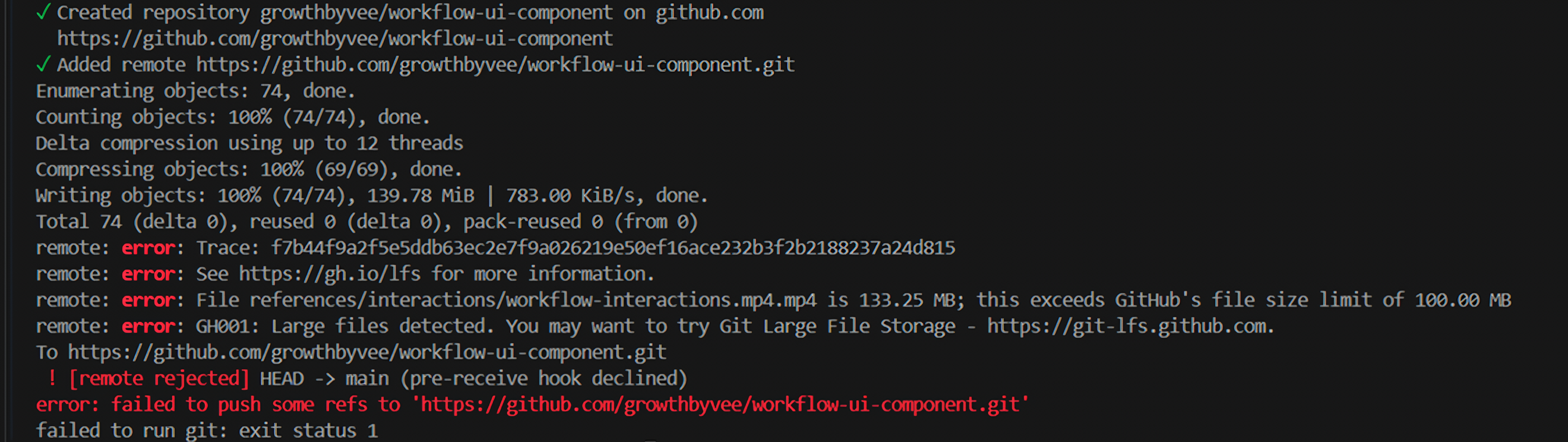
I asked ChatGPT to identify my errors because when I read it, I didn't read it thoroughly and couldn't understand it until I saw it again. The error shows:
File references/interactions/workflow-interactions.mp4.mp4
is 133.25 MB.

This exceeds GitHub's file size limit of 100 MB.
From there it was clear my media file was more than 100 MB. Fortunately my repository already exists on my GitHub account, however, some of my project files haven't been pushed successfully yet.
Why this happened?
One of my projects I uploaded to GitHub has file larger than 100 MB and obviously GitHub rejects it because of it stated in their docs.
Even if I had to delete that big file, Git may still attempt to upload it because it's already included in my initial commit.
So, I kept the file locally, but excluded it from GitHub. And ChatGPT guided me to fix the local Git history without affecting an existing remote version.
Step 1: Add the video to .gitignore
Add-Content .gitignore "`n# Local interaction reference videos`nreferences/interactions/*.mp4"
This prevents Git from tracking my video (.mp4) file in that folder in the future.
Step 2: Remove the video from Git tracking
This command kees my video on my laptop, but it removes from Git's index—not from my local folder.
git rm --cached -- "references/interactions/workflow-interactions.mp4.mp4"
Step 3: Check the changes
Then I could see if the video staged for removal and updated .gitignore
git status
Step 4: Change my initial commit
I typed and ran this command to stage the updated .gitignore
git add .gitignore
Then update the existing commit:
git commit --amend --no-edit
This replaced the original commit with one that doesn't include the oversized video because my v1.0.0 tag was created before the amended commit, it still references the old commit. So, we need to update it too.
Step 5: Update Version 1.0.0 tag and push to GitHub
Now the tag updated to the right commit after I ran this command:
git tag -d v1.0.0
git tag -a v1.0.0 -m "Version 1.0.0 - Initial workflow UI baseline"
Then we push to the main repository,
git push -u origin main
and upload the version tag:
git push origin v1.0.0
I could now see your project files and the v1.0.0 version tag in my repository.
Comments
Join the discussionNo comments yet. Be the first to comment.